
Vidyo on Kubi1.1 - App Store
You'll be able to see results in few seconds.
Publisher Description
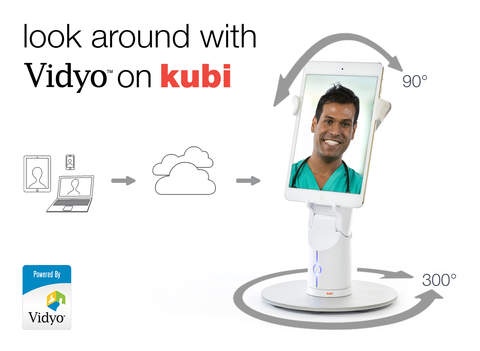
Control your point of view and in-room presence with the Vidyo on Kubi app. Powered by Vidyo, the Kubi app connects a Bluetooth LE enabled iPad to a Kubi telepresence robot. Kubi lets conference participants remotely control the pan and tilt of Kubi through native camera controls in Vidyo.
Vidyo on Kubi
Use standard camera controls in Vidyo apps to control Kubi s position
Pan and tilt features on Kubi changes point of view during Vidyo calls
Have more engaging interactions in healthcare, education and enterprise settings
The Vidyo on Kubi app requires a Vidyo account on an enterprise deployed Vidyo system, from a Vidyo service provider, or sign up for a free trial on the Vidyo website. Vidyo delivers HD quality enterprise-grade point-to-point and multipoint video conferencing over the wireless Internet to virtually any device, including iPad tablets. The same reliable, high performance, low latency video experience that is delivered to high-end room systems and desktops is available on a Kubi-enabled iPad. The device can connect seamlessly with VidyoMobile, VidyoDesktop, VidyoRoom and legacy H.323 and SIP-based endpoints through the VidyoGateway. Camera controls can be accessed from all Vidyo endpoints, with the exception of Vidyo s web browser client for guest access.
Kubi Features
Tablet pairs with Kubi via Bluetooth 4.0.
Microphone, Speaker, and Camera on/off toggle buttons.
Auto-Answer toggle and PIN for added security.
Add contacts and rooms or directly call contacts & join rooms.
I nvite others to your meeting room via email or link.
Works on 3G, 4G, and WiFi Networks.
Kubi Telepresence Robot Hardware Features
Adjustable arms hold all Apple tablets in portrait or landscape.
Mini USB charging port. Includes cable, adapter, 4-hour on-board battery.
Standard tripod screw mount and removable base.
Geared center arms for easy single hand device mounting.
Spring loaded arms keep mobile device secure during use.
Multi-function status indicator button.
Kubi Telepresence Robot System Requirements
iOS 6.0 or later.
iPad 3 (Retina), iPad 4, iPad Air, iPad Air 2, iPad mini, iPad mini Retina, iPad mini 3.
Requires iOS 7.0 or later. Compatible with iPad.
About Vidyo on Kubi
The company that develops Vidyo on Kubi is Revolve Robotics Inc.. The latest version released by its developer is 1.1.
To install Vidyo on Kubi on your iOS device, just click the green Continue To App button above to start the installation process. The app is listed on our website since 2015-10-16 and was downloaded 0 times. We have already checked if the download link is safe, however for your own protection we recommend that you scan the downloaded app with your antivirus. Your antivirus may detect the Vidyo on Kubi as malware if the download link is broken.
How to install Vidyo on Kubi on your iOS device:
- Click on the Continue To App button on our website. This will redirect you to the App Store.
- Once the Vidyo on Kubi is shown in the iTunes listing of your iOS device, you can start its download and installation. Tap on the GET button to the right of the app to start downloading it.
- If you are not logged-in the iOS appstore app, you'll be prompted for your your Apple ID and/or password.
- After Vidyo on Kubi is downloaded, you'll see an INSTALL button to the right. Tap on it to start the actual installation of the iOS app.
- Once installation is finished you can tap on the OPEN button to start it. Its icon will also be added to your device home screen.
Program Details
System requirements
Download information
Pricing
Version History
version 1.1
posted on 2015-10-16
Disclaimer
Official App Store Link
We do not host Vidyo on Kubi on our servers. We did not scan it for viruses, adware, spyware or other type of malware. This app is hosted by Apple and passed their terms and conditions to be listed there. We recommend caution when installing it.
The App Store link for Vidyo on Kubi is provided to you by apps112.com without any warranties, representations or guarantees of any kind, so access it at your own risk.
If you have questions regarding this particular app contact the publisher directly. For questions about the functionalities of apps112.com contact us.
